harry0703
MoneyPrinterTurbo
Writes a narrated short video from a topic: script, voiceover, footage, subtitles
Video framework
- MiniMax H3
- Seedance
- Wan
- +7
128k GitHub stars+257/30dtodayMIT
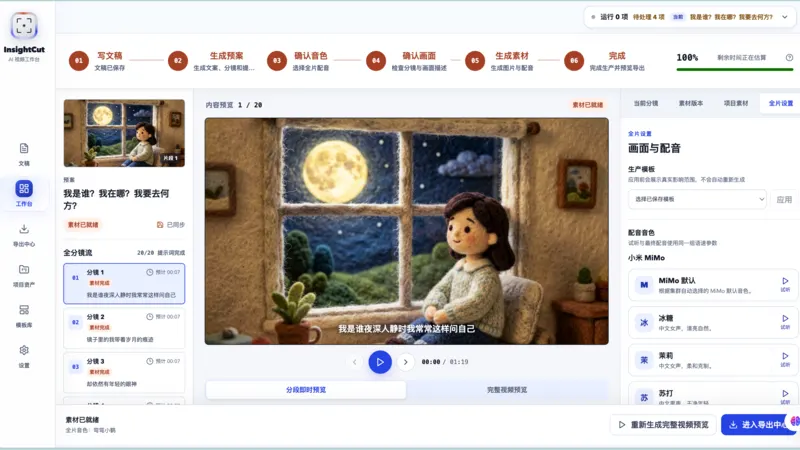
InsightCut turns a one-line topic or a full script into a narrated image video, one image, voiceover and subtitle per segment. You get an MP4, an asset pack, or a draft for Jianying (CapCut's Chinese desktop editor) or CapCut. You can redo one image without starting over. Images come only from the paid Agnes API, and you also need text and voice API keys.
Best for: Creators making narrated explainer or story videos from stills who want to finish the edit in Jianying or CapCut.
Rewritten from the README. Check the repo for the latest steps.
git clone https://github.com/SkyNotSilent/insightcut-jianying-image-video.gitcd insightcut-jianying-image-videocd ai-kepu-video-server, python3.11 -m venv venv311, source venv311/bin/activate, the command below, cp .env.example .env.pip install -r requirements.txtnpm install.cd ../ai-kepu-video-web/frontendai-kepu-video-server/ with the command below, and the frontend in another terminal with npm run dev.python -m uvicorn api_server:app --host 127.0.0.1 --port 2002 --reloadOther editing & audio projects people compare with insightcut-jianying-image-video.
harry0703
Writes a narrated short video from a topic: script, voiceover, footage, subtitles
ATH-MaaS
Type one topic and get a narrated short video: script, images, voice, music
GuanYixuan
JianYing draft files from Python, so you can script your edits
RVC-Boss
Clones a voice from a 5-second clip and reads your text in it
Do you maintain insightcut-jianying-image-video? Add this badge to your README so English speakers can find our write-up.

[](https://openmicrodrama.com/projects/skynotsilent-insightcut-jianying-image-video)The badge links to this page. Want your description changed? Email support@openmicrodrama.com.
Reviewed Oct 3, 2026. The README calls it a single-user prototype that is still changing; it makes still-image videos with basic motion, not AI video clips. We write these descriptions ourselves. The repo's own docs are the final word.